Integrating the Chinese New Year Procreate Dragon Brush into Your Digital Art Workflow
The Lunar New Year represents a significant cultural moment for millions of people worldwide, creating a surge in demand for themed digital content. For illustrators, graphic designers, and social media managers, meeting this demand requires more than just artistic talent; it demands efficient tools that streamline the creative process. The Chinese New Year Procreate Dragon Brush set is designed specifically to address these needs, offering a curated collection of assets that fit seamlessly into the Procreate ecosystem on iPad. By understanding how to integrate these brushes and stamps into your existing workflow, you can reduce production time while maintaining high-quality output for client projects or personal portfolios.
This toolset is not merely a collection of decorative elements; it is a functional resource for professionals who need to execute festive designs with precision and speed. Whether you are creating greeting cards, social media graphics, or editorial illustrations, knowing where this asset fits in your planning and execution phases is crucial for maximizing its value.
Understanding the Asset Composition and Compatibility
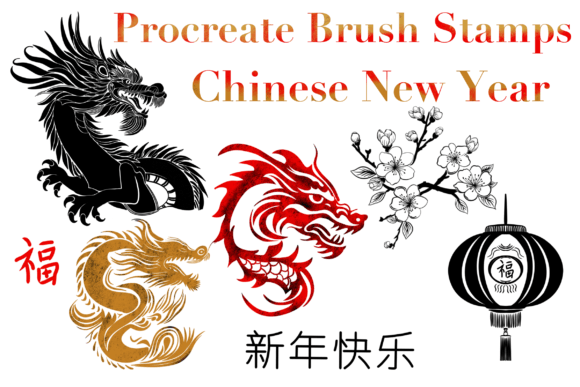
Before implementing any new digital asset, it is essential to understand its components and technical requirements. This specific brush set includes three different writing stamps for Chinese New Year greetings, three distinct dragon illustrations, a festive lantern, a plum blossom branch, and both square and circular borders. These elements are engineered to work exclusively within Procreate, leveraging the app’s native brush engine for optimal performance.
Compatibility is a key factor in workflow efficiency. Since these assets are built for Procreate only, they integrate directly with the iPad’s touch interface and Apple Pencil pressure sensitivity. This means there is no need for complex file conversions or external software adjustments. For professionals who already rely on Procreate for their primary illustration work, this eliminates friction. However, if your workflow involves moving between Photoshop or Illustrator, you must plan for export stages early in the process. Understanding that these are raster-based brushes rather than vector shapes helps in setting the correct document resolution from the start, ensuring that the final output remains crisp for both digital screens and print materials.
Pre-Production Planning and Asset Organization
Effective use of the Chinese New Year Procreate Dragon Brush begins before you draw the first line. Successful integration requires a structured approach to project setup. Start by defining the scope of your project. Are you designing a single social media post, a series of email headers, or a full greeting card suite? The answer determines how you organize your layers and which elements of the brush set you will prioritize.
Create a dedicated folder in your Procreate gallery for Lunar New Year projects. Within this folder, establish a template file that includes standard dimensions for your most common deliverables. Import the brush set into this template so it is readily available. This preparation step saves time during tight deadlines. Additionally, consider the color palette you intend to use. Traditional Chinese New Year colors include red, gold, and black, but modern interpretations may vary. Having a predefined color swatch library ready ensures consistency across all elements, from the dragon scales to the plum blossoms.
Organization extends to layer management. When using stamp brushes, each stamp creates a new layer or modifies the current one depending on settings. Establish a naming convention for your layers, such as "Dragon_Stamp," "Border_Frame," and "Text_Greeting." This practice facilitates easier editing and collaboration if you are working with a team or handing off files to a client for review.
Execution Strategies for Efficient Design
During the creation phase, the versatility of the brush set allows for various implementation strategies. The three dragon stamps offer different poses and styles, providing flexibility in composition. Instead of drawing a dragon from scratch, which can be time-consuming, use these stamps as foundational elements. You can resize, rotate, and adjust the opacity to fit your layout. This approach shifts your focus from technical rendering to compositional balance and storytelling.
The writing stamps for Chinese New Year greetings are particularly useful for maintaining typographic consistency. Hand-lettering Chinese characters requires specific skills and cultural knowledge. By using pre-designed stamps, you ensure accuracy and aesthetic appeal without needing advanced calligraphy expertise. Place these stamps strategically within your design, using the square and circular borders to frame them effectively. The borders serve as visual anchors, guiding the viewer’s eye toward the central message or image.
Incorporate the plum blossom branch and lantern to add depth and context. These elements should not feel tacked on; instead, integrate them into the background or foreground to create a sense of space. Use Procreate’s blending modes to harmonize these stamps with your custom illustrations. For example, setting a lantern stamp to "Multiply" or "Overlay" can help it blend naturally with a textured background, creating a cohesive look rather than a collage of disparate parts.
Quality Control and Refinement
After placing the initial elements, the refinement stage is critical for professional results. Zoom in to check the edges of the stamps. While Procreate brushes are high-quality, resizing them significantly can sometimes affect clarity. If necessary, use the transform tool to adjust positions without losing resolution. Pay attention to the interaction between the dragon stamps and other elements. Ensure that the dragon does not overlap awkwardly with text or borders unless intentional for stylistic effect.
Consistency is key when producing multiple assets. If you are creating a series of images, use the same border style and greeting stamp placement across all designs. This creates a recognizable brand identity or thematic unity. Use Procreate’s duplicate canvas feature to maintain structural consistency while varying the content. This method reduces decision fatigue and speeds up the production process.
Consider the accessibility of your design. Ensure that the contrast between the text stamps and the background is sufficient for readability. If the dragon or lantern elements are too busy, reduce their opacity or blur them slightly to push them into the background. This hierarchy ensures that the primary message remains clear and impactful.
Post-Production and Long-Term Utility
Once the design is complete, the workflow moves to export and distribution. Export your files in the appropriate formats for their intended use. PNGs with transparent backgrounds are ideal for web graphics and overlays, while high-resolution JPEGs or PDFs are better for print. Keep the original Procreate file archived with all layers intact. This allows for future edits or repurposing of elements for next year’s campaigns.
The Chinese New Year Procreate Dragon Brush set is not a one-time use tool. Its components can be adapted for various projects beyond the immediate holiday season. The dragon motifs can be used in fantasy illustrations, the plum blossoms in spring-themed designs, and the borders in general framing tasks. By viewing these assets as part of a broader library, you maximize their return on investment.
For educators and content creators, this toolset can also serve as a teaching aid. Demonstrate how traditional symbols are integrated into modern digital design. Show students or followers how to combine stamped elements with hand-drawn details to create unique compositions. This educational angle adds value to your content and positions you as an expert in digital art workflows.
Optimizing for Professional Outcomes
Integrating specialized brushes like this into your routine requires a mindset focused on efficiency and quality. It is not about replacing skill but augmenting it. By handling repetitive or complex elements like dragons and calligraphy through stamps, you free up mental energy for creative decision-making and client communication. This shift allows you to take on more projects or dedicate more time to refining the unique aspects of each piece.
Remember to stay updated with Procreate’s features. As the app evolves, new blending modes or adjustment tools may enhance how these brushes perform. Experiment with these updates to keep your workflow fresh and competitive. Ultimately, the goal is to produce work that resonates with audiences while maintaining a sustainable and efficient creative process. The right tools, used correctly, make this balance achievable.