Golf Brush Stamps for Procreate iPad
Digital illustration has transformed how we approach design, offering speed and flexibility that traditional media simply cannot match. For artists who love the precision of vector-like assets but crave the organic feel of hand-drawn art, Golf Brush Stamps Procreate IPAD offers a perfect middle ground. This collection is not just a set of clipart; it is a toolkit designed to streamline your workflow while maintaining artistic integrity. Whether you are designing social media graphics for a local tournament, creating custom merchandise, or simply sketching out ideas for a sports-themed project, these stamps provide an immediate visual foundation.
The appeal lies in the immediacy. Instead of spending hours drawing a golf bag from scratch every time you need one, you have a high-quality, hand-drawn asset ready to drop onto your canvas. But the true value emerges when you begin to manipulate these elements. Because they are designed specifically for the Procreate environment on iPad, they integrate seamlessly with your existing brushes, layers, and color palettes. This allows for a level of customization that static PNGs often lack, giving you the freedom to adapt each item to fit your specific aesthetic.
Exploring the Collection: Ten Essential Elements
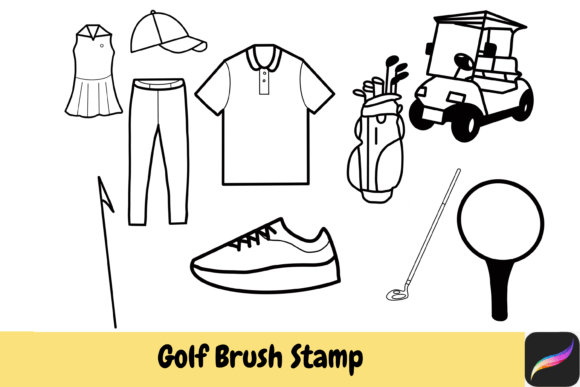
The core of this package consists of ten distinct, hand-drawn items that cover the essential vocabulary of the sport. These are not generic icons; they are stylized illustrations that carry personality and charm. Understanding what is included helps you plan your projects more effectively.
- Golf Club: The primary tool of the game, depicted with clean lines that work well as standalone icons or part of a larger scene.
- Golf Club Bag: A versatile element that adds vertical balance to compositions and implies readiness for play.
- Golf Ball: Simple yet iconic, perfect for patterns, backgrounds, or adding subtle texture to a design.
- Cart: Adds a sense of scale and environment, suggesting the leisurely pace of a round on a sunny day.
- Flag: The universal symbol of the hole, ideal for marking goals or creating focal points in layout designs.
- Cap: Introduces a human element without needing to draw faces, great for apparel mockups or character accessories.
- Shirt: Offers opportunities for pattern play and color blocking, essential for fashion-forward sports designs.
- Trouser: Completes the player’s silhouette, useful for full-body character constructions or uniform designs.
- Dress: Provides a feminine alternative in sportswear illustration, expanding the demographic appeal of your designs.
- Shoe: Grounds the composition, literally and figuratively, adding detail to footwork or equipment close-ups.
Each item is crafted to be modular. You can use them individually as stamps or combine them to create complex scenes. The hand-drawn nature ensures that even when repeated, they do not feel robotic or sterile. This organic quality is crucial for brands that want to appear approachable and authentic rather than corporate and cold.
Creative Applications for Designers and Entrepreneurs
For small business owners and freelancers, time is a currency. Using Golf Hand Drawn Brush Stamps Procreate IPAD allows you to produce professional-grade visuals in a fraction of the time. Consider a local golf pro shop looking to refresh its Instagram presence. Instead of hiring a photographer for every post, you can create engaging graphics using these stamps. Change the colors to match the shop’s branding, add typography, and you have a cohesive feed that looks custom-made.
Marketers can leverage these assets for email newsletters and promotional banners. The casual, sketched style resonates well with audiences who appreciate hobbyist culture. It feels less like an advertisement and more like a shared interest. For example, a newsletter announcing a summer tournament could feature a playful arrangement of the golf cart and flag, colored in vibrant summer tones, to evoke excitement and warmth.
Educators and coaches might find these tools useful for creating instructional materials. Diagrams explaining swing mechanics or course etiquette can be made more engaging with friendly, hand-drawn illustrations rather than stiff technical drawings. The simplicity of the shapes ensures that the focus remains on the information being conveyed, not on distracting details.
Customization and Technical Workflow
One of the strongest features of this collection is its adaptability within Procreate. Since these are brush stamps, they behave like any other brush in your library. This means you can adjust their size, opacity, and rotation with simple gestures. More importantly, you can change their color instantly using your preferred color palette. This is vital for maintaining brand consistency. If your client uses a specific shade of navy and gold, you can sample those colors and apply them to the golf shirt or cap with a single tap.
To get started, you will need to download the file and unzip it. This is a standard step for digital assets and ensures that all components are accessible. Once imported into Procreate, the stamps are ready for immediate use. Remember that these are designed for instant download for small commercial use, meaning you can incorporate them into products you sell, such as prints, stickers, or digital planners, provided you adhere to the licensing terms. Always check the specific license included with your download to understand the scope of "small commercial use," which typically covers independent creators and small businesses rather than large-scale corporate manufacturing.
When applying these stamps, think about layering. Place the golf ball on a lower layer and the club on a higher layer to create depth. Use the blending modes in Procreate to integrate the stamps with textured backgrounds. A multiply mode can make the black outlines of the stamps interact beautifully with paper-texture overlays, giving your digital art a traditional, tactile feel.
Design Tips for Consistency and Clarity
While these stamps are easy to use, achieving a polished look requires attention to detail. Avoid cluttering your composition with too many elements. Choose two or three items that tell the story you want to convey. For instance, a cap and a golf ball might suggest a casual practice session, while a full bag and shoes might imply a serious round. Less is often more when working with illustrative icons.
Color harmony is another critical factor. Since the stamps are line-based, they rely heavily on the colors you choose to fill or accent them. Stick to a limited palette of three to four colors to keep your designs cohesive. You can use the color picker tool in Procreate to ensure that the shades you select complement each other. Experiment with monochromatic schemes for a sophisticated look, or use complementary colors for high-energy, eye-catching graphics.
Finally, consider your audience. If you are designing for a luxury golf club, opt for muted, elegant tones and minimal arrangements. If your target is a youth league or a fun community event, bright, bold colors and playful compositions will resonate more effectively. The flexibility of Golf Brush Stamps Procreate IPAD allows you to pivot between these styles effortlessly, making it a versatile addition to any digital artist’s toolkit.
By integrating these hand-drawn elements into your workflow, you not only save time but also inject a sense of personality into your projects. Whether you are a seasoned designer or a hobbyist exploring digital art, these stamps offer a reliable, creative foundation for your next golf-themed masterpiece.