Ritz - Procreate Lettering Brush: A Practical Review for Digital Artists and Designers
In the expansive ecosystem of digital art tools, finding a brush that balances versatility with specific aesthetic control can be challenging. The Ritz - Procreate Lettering Brush emerges as a specialized tool designed to bridge the gap between functional utility and artistic expression. Tailored specifically for the iPad and Apple Pencil within the Procreate app, this brush set offers a retro vintage aesthetic while maintaining the technical precision required for professional work. For artists ranging from graphic designers to hobbyist illustrators, understanding the nuances of this tool is essential before integrating it into a workflow.
This article explores the distinct features of the Ritz brush, evaluates its dual-version structure, and compares its performance against standard digital inking tools to help you determine if it aligns with your creative needs.
Understanding the Dual-Version Structure
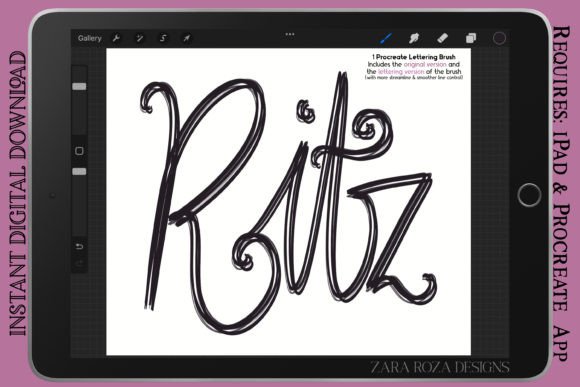
One of the most significant advantages of the Ritz - Procreate Lettering Brush is its inclusion of two distinct versions within a single compressed .zip folder. This approach acknowledges that not all lettering or illustration tasks require the same level of line stability or texture. By providing both a "Regular" and a "Lettering" version, the creator allows users to select the appropriate tool for the specific phase of their project.
The Regular Version: Texture and Sketching
The Original Version, labeled as regular line control, is engineered for artists who value organic imperfection. It suits types of lettering that benefit from a hand-drawn feel, such as rough sketches, preliminary drawings, and casual doodles. When using this version, the pressure sensitivity responds dynamically to create thick and thin width variations, but it retains a slight texture that mimics traditional media like markers or felt-tip pens. This makes it an excellent choice for:
- Rough Sketching: Laying down initial ideas without the pressure of perfect lines.
- Casual Doodles: Creating aesthetic paintings or journal entries where rigidity feels out of place.
- Textured Illustration: Adding character to cartoons or comics that aim for a vintage or handmade look.
For users accustomed to traditional ink on paper, the Regular version provides a familiar resistance and visual feedback, making the transition to digital less sterile.
The Lettering Version: Precision and Flow
In contrast, the Lettering Version is optimized for streamlined line control. This variant smooths out the jitter often associated with handheld digital drawing, making it ideal for final hand lettering, calligraphy, and clean line art. If your goal is to produce bold illustrations, fashion sketches, or detailed manga characters, this version offers the stability needed for long, confident strokes. It excels in scenarios requiring:
- Hand Lettering: Creating consistent baselines and uniform stroke weights.
- Clean Line Art: Outlining details for comic digital art or anime characters.
- Graphic Design Elements: Producing crisp logos or typography that requires scalability and clarity.
The distinction between these two versions allows artists to switch contexts seamlessly. You might start a portrait art piece with the Regular version for the underlying sketch and switch to the Lettering version for the final inked outlines, ensuring both creativity and precision are maintained.
Versatility Across Creative Disciplines
While the name suggests a focus on lettering, the Ritz - Procreate Lettering Brush demonstrates considerable versatility across various artistic disciplines. Its pressure-sensitive engine adapts well to different techniques, making it a viable option for more than just text-based projects.
For fashion sketches and portrait art, the ability to vary line weight quickly is crucial. The brush allows for delicate lines when defining facial features or fabric folds, and broader strokes for shading or emphasizing contours. Similarly, in manga and chibi character art, the retro vintage aesthetic can add a nostalgic charm that modern, ultra-clean vectors often lack. The brush’s performance in drawing makeup charts or detailed cosmetic illustrations also highlights its capacity for fine detail work, provided the user selects the smoother Lettering version.
Furthermore, the brush serves well in graphic design contexts where a human touch is desired. Unlike rigid vector tools, the Ritz brush retains the subtle irregularities of human movement, which can make branding materials or social media graphics feel more approachable and authentic.
Comparing Ritz to Standard Procreate Tools
When evaluating whether to invest in a third-party brush like Ritz, it is helpful to compare it against the default tools available in Procreate. The native Studio Pen or Technical Pen offers extreme consistency and smoothness, which is beneficial for architectural drawings or technical diagrams. However, these defaults can sometimes feel too perfect, lacking the warmth and personality associated with retro vintage aesthetics.
The Ritz - Procreate Lettering Brush fills this gap by introducing controlled imperfection. Where a standard marker brush might feel flat, Ritz offers depth through its pressure sensitivity and texture options. Compared to free brushes found in online communities, Ritz provides a curated experience with tested pressure curves and optimized settings. Free brushes often require manual tweaking to achieve desired results, whereas Ritz is ready to use out of the box, saving time for professionals who need efficiency.
However, it is important to note tradeoffs. If your work requires absolute geometric precision or scalable vector output, a dedicated vector software like Adobe Illustrator may still be necessary. The Ritz brush is raster-based, meaning it is pixel-dependent. While high-resolution canvases mitigate this issue, it is not a replacement for vector tools in large-format printing scenarios.
Decision Factors: Is This Brush Right for You?
Choosing the right digital tool depends largely on your specific workflow and artistic goals. Here are key factors to consider when deciding if the Ritz - Procreate Lettering Brush fits your needs:
- Aesthetic Preference: If you gravitate towards retro, vintage, or hand-crafted styles, this brush is highly relevant. If your style is ultra-modern, minimalist, or corporate, you might prefer cleaner, default tools.
- Project Type: For projects involving extensive hand lettering, calligraphy, or comic outlining, the dual-version setup offers significant value. For pure painting or photo manipulation, other brushes may be more suitable.
- Skill Level: Beginners may find the Lettering Version helpful due to its streamlining capabilities, which compensate for unsteady hands. Advanced users might appreciate the Regular Version for its expressive potential.
- Workflow Integration: Since the file comes in .brush format within a .zip folder, installation is straightforward for Procreate users. Ensure you are comfortable managing digital assets and importing files to your iPad.
Practical Tips for Maximizing Performance
To get the most out of the Ritz - Procreate Lettering Brush, consider adjusting your canvas size and resolution. Higher resolutions allow the pressure sensitivity to shine, providing smoother transitions between thick and thin lines. Additionally, experiment with the opacity and flow settings in Procreate. Lowering the flow can create a buildup effect similar to traditional markers, enhancing the vintage aesthetic.
When working on cartoon portrait art or anime, try using the Regular version for hair textures to add volume and movement, then switch to the Lettering version for facial features to ensure clarity. This hybrid approach leverages the strengths of both versions within a single artwork.
Final Thoughts
The Ritz - Procreate Lettering Brush is a thoughtful resource for digital artists seeking a blend of retro charm and functional precision. Its dual-version structure addresses the common dilemma of choosing between texture and smoothness, allowing users to adapt the tool to various stages of the creative process. While it may not replace vector tools for technical design or heavy-painting brushes for full-color illustrations, it excels in its niche of lettering, line art, and stylized illustration.
For adults aged 20–50 who are exploring digital art tools, evaluating resources, or looking to enhance their Procreate workflow, this brush offers a balanced solution. It invites experimentation while providing the reliability needed for professional outcomes. As with any creative tool, the best way to assess its value is to test it within your own projects, observing how its unique characteristics complement your personal style and artistic vision.