Unlocking Creative Flow with the Soft Serenade Procreate Color Palette
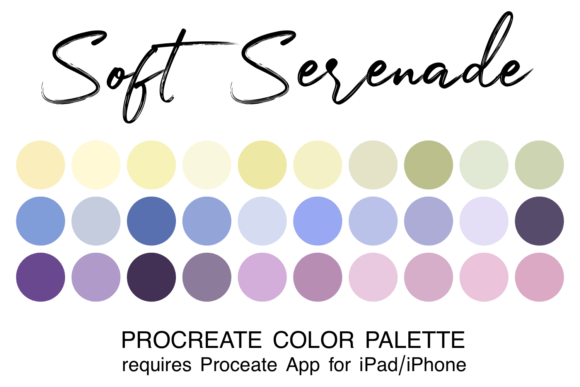
Digital illustration has democratized art creation, placing powerful tools directly into the hands of creators via tablets and smartphones. Yet, despite the technological ease, many artists still face a persistent creative bottleneck: color selection. Staring at an infinite spectrum can be paralyzing. This is where curated resources become indispensable. The Soft Serenade Procreate Color Palette offers a streamlined solution, transforming the often tedious process of color hunting into an intuitive, joyful experience. By providing a pre-coordinated set of thirty hues, this tool allows artists to bypass decision fatigue and dive straight into the heart of their work.
The Psychology of Coordinated Colors in Digital Art
Color is not merely an aesthetic choice; it is a communicative tool. It sets the mood, guides the viewer’s eye, and establishes the emotional tone of a piece. When colors are haphazardly chosen, even the most skilled linework can feel disjointed. Conversely, a harmonious palette creates visual cohesion that feels professional and intentional. The challenge for many digital artists, particularly those working in fast-paced environments or on personal projects with tight deadlines, is achieving this harmony without spending hours adjusting sliders.
The Soft Serenade collection addresses this by offering a thematically unified range of tones. These are not random selections but carefully balanced hues designed to work together seamlessly. Whether you are illustrating a children’s book, designing social media graphics, or sketching character concepts, having a reliable foundation of colors ensures that your artwork maintains a consistent atmosphere. This consistency is crucial for building a recognizable style, which is increasingly important in today’s saturated digital landscape.
Why Thirty Colors? The Power of Limitation
It might seem counterintuitive to limit oneself to just thirty colors when millions are available. However, constraint often breeds creativity. A massive library can lead to "choice overload," where the fear of picking the wrong shade prevents any progress. A curated palette like Soft Serenade acts as a creative guardrail. It provides enough variety to create depth, shading, and highlights, while restricting the range enough to ensure every color complements the others.
- Efficiency: Spend less time mixing and more time drawing.
- Harmony: Eliminate clashing tones that disrupt visual flow.
- Focus: Concentrate on composition, lighting, and storytelling rather than hue selection.
This approach mirrors traditional painting techniques, where masters would mix a limited number of pigments to create a vast array of values. In the digital realm, the Soft Serenade Procreate Color Palette replicates this discipline, offering a modern shortcut to timeless artistic principles.
Seamless Integration into Your Procreate Workflow
One of the greatest advantages of using native file formats within the Procreate ecosystem is the frictionless user experience. The palette comes in the .swatch format, which is specifically designed for the Procreate app on iPad and iPhone. This means there is no need for complex conversions or third-party plugins. The integration is immediate and permanent, becoming part of your core asset library.
For beginners who may be unfamiliar with managing digital assets, the process is straightforward but requires attention to detail. You must have the Procreate app installed on your device to utilize this file. The installation process is designed to be quick, ensuring you can start creating within minutes of purchase.
Step-by-Step Installation Guide
To ensure you get the most out of your new tools, follow these practical steps to install the swatch file correctly:
- Download the File: After purchasing or acquiring the palette, download the zipped file directly to your iPad or iPhone. It will typically land in the "Downloads" folder within your Files app.
- Unzip the Archive: Navigate to the Files app, locate the downloaded zip file, and tap it once to unzip. This will reveal the
.swatchfile inside. - Import to Procreate: Tap on the swatch filename. Your device should recognize the file type and automatically open Procreate, importing the palette into your library.
- Access Your Palette: Open Procreate and create a new canvas. Click on the colored dot in the top right corner of the screen to open the color panel.
- Locate and Set Default: Find the new palette in your list. You can also choose to set it as your default palette, ensuring it loads automatically every time you start a new project.
This simplicity removes technical barriers, allowing artists of all skill levels to focus on what matters most: the art itself.
Versatility Across Modern Creative Projects
The utility of the Soft Serenade Procreate Color Palette extends beyond simple sketches. Its versatile tonal range makes it suitable for a wide array of modern creative industries and hobbies. For graphic designers, it offers a ready-made scheme for branding materials that require a gentle, approachable aesthetic. Illustrators can use it for editorial pieces that need to convey calmness or nostalgia.
Consider the workflow of a content creator. They often need to produce visuals quickly for platforms like Instagram or Pinterest. Using a pre-set palette ensures that their feed maintains a cohesive look, which is vital for audience engagement. Instead of reinventing the wheel for every post, they can rely on the Soft Serenade hues to provide a consistent visual identity. This reliability is a significant time-saver in professional settings where deadlines are tight.
Furthermore, hobbyists and students benefit from the educational aspect of using curated palettes. By observing how the thirty colors interact—how the shadows deepen and the highlights pop—artists can learn valuable lessons about color theory. It serves as a practical study aid, demonstrating how a limited range can produce rich, complex images.
Enhancing the Artistic Process
When the hassle of finding colors is removed, the mental space for creativity expands. Artists report feeling more "in the zone" when using coordinated palettes. The Soft Serenade Procreate Color Palette facilitates this state of flow. You are no longer second-guessing whether a blue matches a green; you know it does because it was designed to. This confidence allows for bolder strokes and more experimental compositions.
Additionally, the palette supports various blending modes and brush types within Procreate. Whether you are using textured brushes for a painterly effect or clean vectors for a graphic look, the colors adapt beautifully. The saturation and brightness levels are balanced to prevent muddy results when layers are merged or opacity is adjusted.
Making the Right Choice for Your Toolkit
Before adding any new asset to your digital toolkit, it is wise to consider your specific needs. Are you looking for vibrant, neon energy, or something more subdued and elegant? The Soft Serenade name implies a gentle, soothing quality. If your work leans towards whimsical, romantic, or calming themes, this palette is an ideal match. It is less suited for high-contrast, cyberpunk, or horror aesthetics, which require sharper, more aggressive color contrasts.
However, even if your style varies, having a "go-to" palette for softer projects is invaluable. Many professional artists maintain a library of several curated palettes for different moods. Adding Soft Serenade to your collection ensures you are prepared for any commission or personal project that calls for a delicate touch.
In conclusion, the transition from struggling with color selection to flowing through the creative process is made possible by tools like the Soft Serenade Procreate Color Palette. It represents a shift towards smarter, more efficient digital artistry. By leveraging pre-coordinated colors, you invest in your own productivity and artistic satisfaction. The ease of installation, combined with the practical benefits of a themed palette, makes it a worthy addition to any Procreate user’s arsenal. Embrace the simplicity, trust the coordination, and let your creativity sing with a soft serenade.